Search

Friday, 20 September 2013

How to Hack Wi-Fi: Cracking WPA2-PSK Passwords with Cowpatty


How to Hack Wi-Fi: Cracking WPA2-PSK 

Passwords with Cowpatty


I want to demonstrate another excellent piece of hacking software for cracking WPA2-PSK 

passwords. A few months ago, we cracked WPA2 using aircrack-ng. In this tutorial, we'll 

use a piece of software developed by wireless security researcher Joshua Wright called 

cowpatty (often stylized as coWPAtty). This app simplifies and speeds up the 

dictionary/hybrid attack against WPA2 passwords, so let's get to it!

Step 1: Find the Cowpatty

Cowpatty is one of the hundreds of pieces of software that are included in the BackTrack 

suite of software. For some reason, it was not placed in the /pentest/wireless directory, but 

instead was left in the /usr/local/bin directory, so let's navigate there.

[code]

cd /usr/local/bin

Because cowpatty is in the /usr/local/bin directory and this directory should be in your 


PATH, we should be able to run it from any directory in BackTrack.

Step 2:
Find the Cowpatty Help Screen

To get a brief rundown of the cowpatty options, simply type:


[code]

cowpatty

BackTrack will provide you a brief help screen. Take a note that cowpatty requires all of the 


following.

- a word list

- a file where the password hash has been captured

- the SSID of the target AP

Step 3:
Place the Wireless Adapter in Monitor Mode

Just as in cracking with aircrack-ng, we need to put the wireless adapter into monitor mode.

[code]

airmon-ng start wlan0

Step 4:
Start a Capture File

Next, we need to start a capture file where the hashed password will be stored when we 

capture the 4-way handshake.

[code]

airodump-ng --bssid 00:25:9C:97:4F:48 -c 9 -w cowpatty mon0

This will start a dump on the selected AP (00:25:9C:97:4F:48), on the selected channel (-c 


9) and save the the hash in a file named cowcrack.

Step 5:
Capture the Handshake

Now when someone connects to the AP, we'll capture the hash and airdump-ng will show 

us it has been captured in the upper right-hand corner.

Step 6:
Run the Cowpatty

Now that we have the hash of the password, we can use it with cowpatty and our wordlist 

to crack the hash.

[code]

cowpatty -f /pentest/passwords/wordlists/darkc0de.lst -r /root/cowcrack-01.cap -s Mandela2

As you can see in the picture, cowpatty is generating a hash of every word on our wordlist 


with the SSID as a seed and comparing it to the captured hash. When the hashes match, it 

dsplays the password of the AP.

Step 7: Make Your Own Hash

Although running cowpatty can be rather simple, it can also be very slow. The password 

hash is hashed with SHA1 with a seed of the SSID. This means that the same password on 

different SSIDs will generate different hashes. This prevents us from simply using a 

rainbow 

table against all APs. Cowpatty must take the password list you provide and compute the 

hash with the SSID for each word. This is very CPU intensive and slow.

Cowpatty now supports using a pre-computed hash file rather than a plain-text word file, 


making the cracking of the WPA2-PSK password 1000x faster! Pre-computed hash files are 

available from the Church of WiFi, and these pre-computed hash files are generated using 

172,000 dictionary file and the 1,000 most popular SSIDs. As useful as this is, if your SSID 

is not in that 1,000, the hash list really doesn't help us.

In that case, we need to generate our own hashes for our target SSID. We can do this by 


using an application called genpmk. We can generate our hash file for the "darkcode" 

wordlist for the SSID "Mandela2" by typing:

[code]

genpmk -f /pentest/passwords/wordlists/darkc0de.lst -d hashes -s Mandela2

Step 8: Using Our Hash

Once we have generated our hashes for the particular SSIDs, we can then crack the 

password with cowpatty by typing:

[code]

cowpatty -d hashfile -r dumpfile -s ssid

Download Torrent Files Directly To Your DropBox Account

Download Torrent Files Directly To Your 

DropBox Account


Torrent is the popular way of downloading stuffs from the Internet. We all use sometorrent client and then start downloading files from Internet. There are some web based clients are also available that allow us download torrent files. But in schools, colleges and office, torrents clients are blocked but those places have high speed Internet. If torrentclients are blocked then we can not use that high speed Internet to download our favorite files from the web.
Download Torrents Files to your DropBox Account Without Any Torrent Client

For this kind of situation, I know a nice web based torrent client called BoxoPus. BoxoPus works in different way. It download file from torrent and then upload it directly to your Dropbox account. It does not have any limit and offers unlimited traffic.

How to Use Boxopus

Boxopus is very simple and work fast. Just visit Boxopus and register for a new account. You can use your Facebook, Twitter or Dropbox account to login on Boxopus.

Then you well see a big text box with browser button. Now pick a torrent file from your system and click on "Put IN My DropBox" button.
Download Torrents Files to your DropBox Account Without Any Torrent Client

Then it will show you the detail of the torrent with a big "Start Download" Button. Click on the button to start download.

You also need to authorize the app to access your dropbox account to put the file in it. After that it will start downloading the file and it will directly saved in the DropBox account inside a folder Boxopus.


This app is really helpful for those who want to download movies from the high speed Internet in office or schools.

If you like this post, share it with your friends on various social media websites. Don't forget to subscribe us to get this kind of tips.

2013 latest Technology That May Change The World

2013 latest Technology That May 

Change The World

Technology That May Change The World

INTRODUCTION 

We have seen great leaps in digital technology in past the past five years. Smartphones, cloud computing, multi-touch tablets, these are all innovations that revolutionized the way we live and work. However, believe it or not, we are just getting started. Technology will get even better. In the future, we could live like how people in science fiction movies did.

IOS 7 (Latest )

iOS 7 is the seventh version of the iOS mobile operating system and is the successor to iOS 6. It was announced at the company's Apple Worldwide Developers Conference (WWDC) on June 10, 2013, and was released on September 18. It includes a redesigned user interface and a number of improvements to the operating system's functionality. The design of iOS 7's new elements was led by Jonathan "Jony" Ive, Apple's Senior Vice President of Design.

Google Glass

Google Glass (styled "GLΛSS") is a wearable computer with an optical head-mounted display (OHMD) that is being developed by Google in the Project Glass research and development project, with a mission of producing a mass-market ubiquitous computer. Google Glass displays information in a smartphone-like hands-free format, that can communicate with the Internet via natural language voice commands. 
While the frames do not currently have lenses fitted to them, Google is considering partnerships with sun glass retailers such as Ray-Ban or War by Parker, and may also open retail stores to allow customers to try on the device.[1] The Explorer Edition cannot be used by people who wear prescription glasses, but Google has confirmed that Glass will eventually work with frames and lenses that match the wearer's prescription; the glasses will be modular and therefore possibly attachable to normal prescription glasses. 
Glass is being developed by Google X, which has worked on other futuristic technologies such as driverless cars. The project was announced on Google+ by Project Glass lead Babak Parviz, an electrical engineer who has also worked on putting displays into contact lenses; Steve Lee, a product manager and "geolocation specialist"; and Sebastian Thrun, who developed Udacity as well as worked on the autonomous car project.[13]Google has patented the design of Project Glass.[14][15] Thad Starner, an augmented reality expert, is a technical lead/manager on the project.

Form 1

Just as the term suggests, 3D Printing is the technology that could forge your digital design into a solid real-life product. It’s nothing new for the advanced mechanical industry, but a personal 3D printer is definitely a revolutionary idea.
Everybody can create their own physical product based on their custom design, and no approval needed from any giant manufacturer! Even the James Bond’s Aston Martin which was crashed in the movie Was a 3D Printed Product.

Oculus Rift
Virtual Reality gaming is here in the form of Oculus Rift . This history-defining 3D headset lets you mentally feel that you are actually inside a Video Game. In the Rift’s virtual world, you could turn your head around with ultra-low latency to view the world in high resolution display.
There are premium products in the market that can do the same, but Rift wants you to enjoy the experience at only $300, and the package even comes as a development kit. This is the beginning of the revolution for next-generation gaming.
The timing is perfect as the world is currently bombarded with the virtual reality topic that could also be attributed to Sword Art Online, the anime series featuring the characters playing games in an entirely virtual world. While we’re getting there, it could take a few more years to reach that level of realism. Oculus Rift is our first step.

Leap Motion
Multi-touch desktop is a (miserably) failed product due to the fact that hands could get very tired with prolonged use, but Leap Motion wants to challenge this dark area again with a more advanced idea. It lets you control the desktop with fingers, but without touching the screen.
It’s not your typical motion sensor, as Leap Motion allows you to scroll the web page, zoom in the map and photos, sign documents and even play a first person shooter game with only hand and finger movements. The smooth reaction is the most crucial key point here. More importantly, you can own this future with just $70, a price of a premium PS3 game title!
If this device could completely work with Oculus Rift to simulate a real-time gaming experience, gaming is going to get a major make-over.

Eye Tribe
Eye tracking has been actively discussed by technology enthusiasts throughout these years, but it’s really challenging to implement. But Eye Tribe actually did this. They successfully created the technology to allow you to control your tablet, play flight simulator, and even slice fruits in Fruit Ninja only with your eye movements.
It’s basically taking the common eye-tracking technology and combining it with a front-facing camera plus some serious computer-vision algorithm, and voila, fruit slicing done with the eyes! A live demo was done in LeWeb this year and we may actually be able to see it in in action in mobile devices in 2013.
Currently the company is still seeking partnership to bring this sci-fi tech into the consumer market but you and I know that this product is simply too awesome to fail.
Firefox OS
iOS and Android are great, but they each have their own rules and policies that certainly inhibit the creative efforts of developers. Mozilla has since decided to build a new mobile operating system from scratch, one that will focus on true openness, freedom and user choice. It’s Firefox OS.
Firefox OS is built on Gonk, Gecko and Gaia software layers – for the rest of us, it means it is built on open source, and it carries web technologies such as HTML5 and CSS3.
Developers can create and debut web apps without the blockade of requirements set by app stores, and users could even customize the OS based on their needs. Currently the OS has made its debut on Android-compatible phones, and the impression so far, is great.
You can use the OS to do essential tasks you do on iOS or Android: calling friends, browsing web, taking photos, playing games, they are all possible on Firefox OS, set to rock the smart phone market.

Project Fiona
Meet the first generation of the gaming tablet. Razer’s Project Fiona is a serious gaming tablet built for hardcore gaming. Once it’s out, it will be the frontier for the future tablets, as tech companies might want to build their own tablets, dedicated towards gaming
Google driverless car
The Google driverless car is a project by Google that involves developing technology for autonomous cars. The software powering Google's cars is called Google Chauffeur.[2] Lettering on the side of each car identifies it as a "self-driving car." The project is currently being led by Google engineer Sebastian Thrun, director of the Stanford Artificial Intelligence Laboratory and co-inventor of Google Street View. Thrun's team at Stanford created the robotic vehicle Stanley which won the 2005 DARPA Grand Challenge and its US$2 million prize from the United States Department of Defense.[3] The team developing the system consisted of 15 engineers working for Google, including Chris Urmson, Mike Montemerlo, and Anthony Levandowski who had worked on the DARPA Grand and Urban Challenges.[4]
The U.S. state of Nevada passed a law on June 29, 2011 permitting the operation of autonomous cars in Nevada. Google had been lobbying for robotic car laws.[5][6][7] The Nevada law went into effect on March 1, 2012, and the Nevada Department of Motor Vehicles issued the first license for an autonomous car in May 2012. The license was issued to a Toyota Prius modified with Google's experimental driverless technology.[8] As of April 2012, Florida became the second state to allow the testing of autonomous cars on public roads.[9] California became the third state to legalize the use of self-driven cars for testing purposes as of September 2012 when Governor Jerry Brown signed the bill into law at Google HQ in Mountain View.

Top Trends for 2013

1) Internet of Things
The Internet of Things is more than just the newest buzzword. The IoT promises to be the most disruptive technological revolution since the advent of the World Wide Web. Projections indicate that up to 100 billion uniquely identifiable objects will be connected to the Internet by 2020, but human understanding of the underlying technologies has not kept pace. This creates a fundamental challenge to researchers, with enormous technical, socioeconomic, political, and even spiritual consequences.
2) Cybersecurity
Recent technological advances in computing, communications, software, and hardware have enabled the significant growth of cyberspace, an important aspect of modern life that continues to transform the way citizens, business, and governments interact, collaborate, and conduct business. Our heavy dependence on various digital infrastructures has made them strategic national assets that must be protected to ensure economic growth, prosperity, and safety in the future.

3) Big Data Visualization
We've entered a data-driven era, in which data are continuously acquired for a variety of purposes. The ability to make timely decisions based on available data is crucial to business success, clinical treatments, cyber and national security, and disaster management. Additionally, the data generated from large-scale simulations, astronomical observatories, high-throughput experiments, or high-resolution sensors will help lead to new discoveries if scientists have adequate tools to extract knowledge from them.

4) Cloud Computing in Science and Engineering
Cloud computing has emerged as a dominant paradigm, widely adopted by enterprises. Clouds provide on-demand access to computing utilities, an abstraction of unlimited computing resources, and support for on-demand scale-up, scale-down, and scale-out. Cloud platforms are also rapidly becoming viable for scientific exploration and discovery, as well as education. As a result, it is critical to understand application formulations and usage modes that are meaningful in such a hybrid infrastructure, the fundamental conceptual and technological challenges, and ways that applications can effectively utilize clouds.
5) Mobile Computing Meets the Cloud
It could be argued that two of the most important technological developments of the last few years are the emergence of mobile and cloud computing. By shifting the hardware and staffing costs of managing computational infrastructure to third parties such as Google, Microsoft, or Amazon, cloud computing has made it possible for small organizations and individuals to deploy world-scale services; all they need to pay is the marginal cost of actual resource usage. At the same time, the deployment of 3G and 4G networks, the rapid adoption of feature-rich smartphones, and the growing integration of computation into consumer products such as cars and home appliances, have brought mobile and pervasive computing into the mainstream.
6) Internet Censorship and Control
The Internet is a battleground where fights for technical, social, and political control are waged, including between governments and their citizens, separate governments, and competing commercial interests. These fights take many forms, including Internet filtering versus circumvention, surveillance versus anonymization, denial of service attacks and intrusion attempts versus protection mechanisms, and on- and offline persecution and defense of online activists. These battles impact and are impacted by the Internet's technical structure. As the Internet continues to embed itself into our world, its structural changes will have an increasing effect on our social and political structures, and our social and political structures will have increasing impact on the Internet's technical structure. This special issue of IEEE Internet Computing will explore the technical, social, and political mechanisms and impacts of Internet censorship and control.
7) Interactive Public Displays 
Next-Generation Mobile Computing
9) 3D Imaging Techniques and Multimedia Applications
10) Safety-Critical Systems: The Next Generation

13) Multicore Memory Coherence
As we enter an era of large multicores, the question of efficiently supporting a shared memory model has become of paramount importance. Massively parallel architectures lacking coherent shared memory have enjoyed great success in niche applications such as 3D rendering, but general programming developers still demand the convenience of a shared memory abstraction

Finally, BlackBerry Messenger is coming to Android and iPhone this weekend

Finally, BlackBerry Messenger is coming 

to Android and iPhone this weekend


The BBM app will be available for devices running Android 4.0 and up, or iOS 6 and iOS 7. 

It will allow Android and iOS users to communicate with BlackBerry owners.

BlackBerry's popular BlackBerry Messenger (BBM) instant chat application will be available 

for Google's Android and Apple's iPhone this weekend, the company said.


Rumors about the app coming to Android and iPhone started in June. The app will be 


available for devices running Android 4.0 and up, or iOS 6 and iOS 7. It will allow Android 

and iOS users to communicate with BlackBerry owners.

BlackBerry Messenger (BBM) is a proprietary Internet-based instant messenger and 


videotelephony application included on BlackBerry devices that allows messaging (and 

videocalls for BlackBerry 10 smartphones) between BlackBerry users. BBM currently has 

more than 60 million monthly active customers on BlackBerry alone, and the overwhelming 

majority use BBM an average of 90 minutes per day.

The news comes in the wake of other rumors that Blackberry could fire 40% of its staff. 


This comes at a time that the company is suffering heavy losses from its failed PlayBook 

tablet and a fading popularity in the smartphone market.

BBM for Android and iPhone features:

BBM Chat – Enjoy real, immediate conversations with friends on Android, iPhone and 


BlackBerry smartphones. Not only does BBM let you know that your message has been 

delivered and read, it also shows you that your friend is responding to the message.

More than chat – With BBM you can share files on your phone such as photos and voice 


notes, all in an instant.

Keep your group in the loop – Multi-person chats are a great way to invite contacts to chat 


together. BBM Groups lets you invite up to 30 friends to chat together, and go a step 

further 

than multi-chat by sharing photos and schedules. And, with Broadcast Message, you can 

send a message out to all your BBM contacts at once.

Post Updates and stay in the know – BBM lets you post a personal message, profile picture 


and your current status, and lets your contacts know instantly in Updates.

Your unique PIN – Every BBM user has a unique PIN that maintains your privacy, so you 


don’t have to give out your phone number or email address to a new or casual contact.

Availability: BBM will be available as a free download for Android smartphones running Ice 


Cream Sandwich and Jelly Bean (Android 4.x) beginning at 7AM EDT on September 21. 

BBM for iPhones running iOS 6 and iOS 7 will become available for each market on the App 

Store schedule of 12:01 AM local time on September 22.

You can download the app from the BBM website: www.bbm.com


lock screen vulnerabilities, the passcode lock screen on iOS 7 also suffers from a bug that allows anyone with direct access to the iPhone or iPad.

lock screen vulnerabilities, the passcode lock screen on iOS 7 also suffers from a bug that allows anyone with direct access to the iPhone or iPad.


Although Apple claims to have fixed 80 security vulnerabilities with iOS 7, including the ability to bypass the lock screen in iOS 6.1.3, the same person who found the previous vulnerability has found yet another in iOS 7.
Discovered by 'Jose Rodriquez', an iPhone user reported a security flaw in iOS that lets anyone bypass the lockscreen passcode and access sensitive information stored in photos, Twitter, email and more.
The flaw resides on users who lock their devices with a traditional PIN code or password. The security flaw is demonstrated in the video below and it works as follows:


  • Swipe up from the bottom of the Lock screen to open Control Center and Launch the Clock app.
  • Open the Alarm Clock section of the Clock app and Hold down the power button.
  • Quickly tap Cancel the immediately double-click the Home button and
  • Hold down for a bit longer on the second click.

From here you can access the camera and stored photos. You can share these photos on Facebook, Twitter, Flickr or via email.
The exploit has been tested successfully on iOS 7 when running on the iPhone 4S, 5, 5C, and 5S, and the most recent iPad model.

Until an official fix is available from Apple, iOS 7 users can avoid this security hole by disabling the control center of the lock screen in their device settings.

how to enable administrator account in windows 8.


 How to enable administrator account in windows 8.


Follow the given simple steps in order 

to 

enable administrator account in 

windows 8.


Method # 1:


1) Right click on my computer and then click on Manage.

Enable-administrator-account-in-Windows 8

2) Now click on Local users and Groups and then click on Users.

Enable-administrator-account-in-Windows 8

3) Right click on administrator account and then give a click on Properties. A dialog box will


 appear on your computer screen. Now uncheck the Account is disabled option from the 

appeared dialog box.

Enable-administrator-account-in-Windows 8

4) Right after above step, Click on Apply then given a click on O.k button.

Method # 2:


Follow the easy steps given below for to enable administrator account in windows 8.

1) Press win+R key from your keyboard to launch run dialog box.

2) Type cmd in run dialog box and press enter. A command prompt will appear on your screen.

3) Now write the given simple command to enable administrator account and press enter from your keyboard.
net user administrator /active:yes
For to disable the administrator account , write the given command and press enter.
net user administrator /active:no

All Methods How to Open or Access Blocked Websites at Schools,College and Office Work

All methods How to Open or Access Blocked Websites at Schools,College and Office Work 

Nowadays many schools and colleges are Providing internet access in their campus, but with a restriction.They are Blocking many popular sites like Facebook, twitter, etc.So in this article I would like to discuss the Best ways to access Blocked Websites.
All Methods How to Open or Access Blocked Websites at Schools,College and Office Work 

1.Using IP address instead of Web Site URL

All Methods How to Open or Access Blocked Websites at Schools,College and Office Work 
Most of the software which block the sites in our PC uses Website address/URL only like i.e. www.Facebook.com, www.twitter.com, etc.So can access those sites with their IP address instead of URL.Every website has its unique IP address same as the Computer and mobile devices.To get IP address of a website Simply Run Command Prompt and type:-
       Type Command: ping domain.com
Type this command in Command Prompt and replace "doamin.com" with the site URL of which you want to get IP address.
All Methods How to Open or Access Blocked Websites at Schools,College and Office Work 
  • For Ex: ping google.com
  • IP address of google -->74.125.236.142/
All Methods How to Open or Access Blocked Websites at Schools,College and Office Work 
All Methods How to Open or Access Blocked Websites at Schools,College and Office Work
You will see one IP address many times its your web site Address just note down it and run it on your browser.
All Methods How to Open or Access Blocked Websites at Schools,College and Office Work 

2.Using Manual Proxy in Browser

All Methods How to Open or Access Blocked Websites at Schools,College and Office Work 
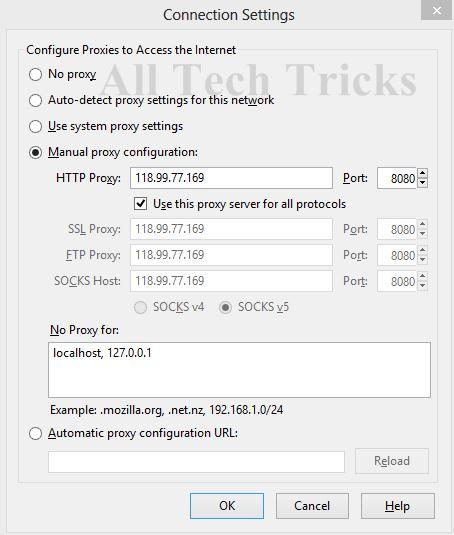
Many Popular browsers support manual Proxy IP address.So using those proxy you can surf anonymously and access all blocked web sites.There are huge list of Free Proxy available on Internet so don't need to buy.You can get it from Here.
All Methods How to Open or Access Blocked Websites at Schools,College and Office Work 
Manual+Proxy
All Methods How to Open or Access Blocked Websites at Schools,College and Office Work 

How to set manual Proxy in Mozilla Firefox:

All Methods How to Open or Access Blocked Websites at Schools,College and Office Work 
Run Firefox browser and go to Option and then click on Advance.Then go to Network Tab and Click Connection settings button.A new box will appear click on Manual Proxy Settings.Now enter Proxy address and Port in box and click on save settings.Now you are surfing internet using Proxy. Many proxy will not work on you Computer so don't worry just keep changing the Proxy address which are not working with the new address.
All Methods How to Open or Access Blocked Websites at Schools,College and Office Work 

3.Redirecting Blocked web sites with URL Shorten Service

All Methods How to Open or Access Blocked Websites at Schools,College and Office Work 
Everyone knows URL shortner sites are used to convert Long URL to Short.But URL shortner site allow you to bypass the security settings.You can use following URL shortner sites Tiny URL, MooURL.

4.Using VPN software to unblock Websites

All Methods How to Open or Access Blocked Websites at Schools,College and Office Work 
Using VPN is the best way to access blocked ways.VPN software allows you to browse anonymously, just download it and install on you PC.This Software is available in both paid and free version.Here i have listed some best VPN software.
All Methods How to Open or Access Blocked Websites at Schools,College and Office Work 
VPN+software
All Methods How to Open or Access Blocked Websites at Schools,College and Office Work 
1.ProxyXPN VPN

2.Hotspot Shield VPN
3.Tunnel Bear VPN
All Methods How to Open or Access Blocked Websites at Schools,College and Office Work 

5.Surfing using TOR browser


All Methods How to Open or Access Blocked Websites at Schools,College and Office Work 
TOR+browser

You can use TOR browser to access the blocked websites, but you can't access social networking sites Like Facebook, Twitter, etc.Because these sites needs to store cookies in browser.So you can't access the sites which stores Cookies.Using TOR is the best way to hide you online identity.Just download TOR browser from the below link:- Download from here
All Methods How to Open or Access Blocked Websites at Schools,College and Office Work 

6.Using Decimal Code

All Methods How to Open or Access Blocked Websites at Schools,College and Office Work 
As in the first method i showed instead of using URL, you can access Site using there IP address.But what if there IP address are also blocked, so here works decimal codes.Decimal codes are nothing rather than conversion of IP address in decimal.You can access Blocked web site with their Decimal number and to get Decimal number you need IP address of the Web site URL (Showed in Method 1). Just note down IP address and covert it using this tool. 
All Methods How to Open or Access Blocked Websites at Schools,College and Office Work 

7.Reading web page in E-mail box

All Methods How to Open or Access Blocked Websites at Schools,College and Office Work 
Email the web is a free service which sends web sites straight away to you mail box.To get web page via mail you have to register on Email the web site and enter the web site URL and enter e-mail address.And you are done.
All Methods How to Open or Access Blocked Websites at Schools,College and Office Work 

8.Using Hola extension

All Methods How to Open or Access Blocked Websites at Schools,College and Office Work 
All Methods How to Open or Access Blocked Websites at Schools,College and Office Work
Hola is a Browser extension which allows you to browse internet anonymously.Hola Browser extension is available for all major Browser.You can download extension for your browser from there official website.
All Methods How to Open or Access Blocked Websites at Schools,College and Office Work  

9.Using Translation service

All Methods How to Open or Access Blocked Websites at Schools,College and Office Work 
Major Search engines like Google and Bing provide you a translation service to covert web page from one language to another.To access blocked web site from this servce, just enter the Web site URL of blocked which you wnat access and convert it into any other languages.Using this you cna convert whole web page into other language and access its content. 
All Methods How to Open or Access Blocked Websites at Schools,College and Office Work 

10.Using Wayback Machine

All Methods How to Open or Access Blocked Websites at Schools,College and Office Work 
All Methods How to Open or Access Blocked Websites at Schools,College and Office Work
All Methods How to Open or Access Blocked Websites at Schools,College and Office Work 
Wayback machine is an online service which keeps a copy of all most all web sites from the day they were started.Just enter Web site URL and click on the latest copy of wayback machine.Using this service you can access Blocked website.
All Methods How to Open or Access Blocked Websites at Schools,College and Office Work 

I hope guys you enjoyed the article.If have any query Feel Free to ask in Comments.