Search

Friday, 20 September 2013

Finally, BlackBerry Messenger is coming to Android and iPhone this weekend

Finally, BlackBerry Messenger is coming 

to Android and iPhone this weekend


The BBM app will be available for devices running Android 4.0 and up, or iOS 6 and iOS 7. 

It will allow Android and iOS users to communicate with BlackBerry owners.

BlackBerry's popular BlackBerry Messenger (BBM) instant chat application will be available 

for Google's Android and Apple's iPhone this weekend, the company said.


Rumors about the app coming to Android and iPhone started in June. The app will be 


available for devices running Android 4.0 and up, or iOS 6 and iOS 7. It will allow Android 

and iOS users to communicate with BlackBerry owners.

BlackBerry Messenger (BBM) is a proprietary Internet-based instant messenger and 


videotelephony application included on BlackBerry devices that allows messaging (and 

videocalls for BlackBerry 10 smartphones) between BlackBerry users. BBM currently has 

more than 60 million monthly active customers on BlackBerry alone, and the overwhelming 

majority use BBM an average of 90 minutes per day.

The news comes in the wake of other rumors that Blackberry could fire 40% of its staff. 


This comes at a time that the company is suffering heavy losses from its failed PlayBook 

tablet and a fading popularity in the smartphone market.

BBM for Android and iPhone features:

BBM Chat – Enjoy real, immediate conversations with friends on Android, iPhone and 


BlackBerry smartphones. Not only does BBM let you know that your message has been 

delivered and read, it also shows you that your friend is responding to the message.

More than chat – With BBM you can share files on your phone such as photos and voice 


notes, all in an instant.

Keep your group in the loop – Multi-person chats are a great way to invite contacts to chat 


together. BBM Groups lets you invite up to 30 friends to chat together, and go a step 

further 

than multi-chat by sharing photos and schedules. And, with Broadcast Message, you can 

send a message out to all your BBM contacts at once.

Post Updates and stay in the know – BBM lets you post a personal message, profile picture 


and your current status, and lets your contacts know instantly in Updates.

Your unique PIN – Every BBM user has a unique PIN that maintains your privacy, so you 


don’t have to give out your phone number or email address to a new or casual contact.

Availability: BBM will be available as a free download for Android smartphones running Ice 


Cream Sandwich and Jelly Bean (Android 4.x) beginning at 7AM EDT on September 21. 

BBM for iPhones running iOS 6 and iOS 7 will become available for each market on the App 

Store schedule of 12:01 AM local time on September 22.

You can download the app from the BBM website: www.bbm.com


lock screen vulnerabilities, the passcode lock screen on iOS 7 also suffers from a bug that allows anyone with direct access to the iPhone or iPad.

lock screen vulnerabilities, the passcode lock screen on iOS 7 also suffers from a bug that allows anyone with direct access to the iPhone or iPad.


Although Apple claims to have fixed 80 security vulnerabilities with iOS 7, including the ability to bypass the lock screen in iOS 6.1.3, the same person who found the previous vulnerability has found yet another in iOS 7.
Discovered by 'Jose Rodriquez', an iPhone user reported a security flaw in iOS that lets anyone bypass the lockscreen passcode and access sensitive information stored in photos, Twitter, email and more.
The flaw resides on users who lock their devices with a traditional PIN code or password. The security flaw is demonstrated in the video below and it works as follows:


  • Swipe up from the bottom of the Lock screen to open Control Center and Launch the Clock app.
  • Open the Alarm Clock section of the Clock app and Hold down the power button.
  • Quickly tap Cancel the immediately double-click the Home button and
  • Hold down for a bit longer on the second click.

From here you can access the camera and stored photos. You can share these photos on Facebook, Twitter, Flickr or via email.
The exploit has been tested successfully on iOS 7 when running on the iPhone 4S, 5, 5C, and 5S, and the most recent iPad model.

Until an official fix is available from Apple, iOS 7 users can avoid this security hole by disabling the control center of the lock screen in their device settings.

how to enable administrator account in windows 8.


 How to enable administrator account in windows 8.


Follow the given simple steps in order 

to 

enable administrator account in 

windows 8.


Method # 1:


1) Right click on my computer and then click on Manage.

Enable-administrator-account-in-Windows 8

2) Now click on Local users and Groups and then click on Users.

Enable-administrator-account-in-Windows 8

3) Right click on administrator account and then give a click on Properties. A dialog box will


 appear on your computer screen. Now uncheck the Account is disabled option from the 

appeared dialog box.

Enable-administrator-account-in-Windows 8

4) Right after above step, Click on Apply then given a click on O.k button.

Method # 2:


Follow the easy steps given below for to enable administrator account in windows 8.

1) Press win+R key from your keyboard to launch run dialog box.

2) Type cmd in run dialog box and press enter. A command prompt will appear on your screen.

3) Now write the given simple command to enable administrator account and press enter from your keyboard.
net user administrator /active:yes
For to disable the administrator account , write the given command and press enter.
net user administrator /active:no

All Methods How to Open or Access Blocked Websites at Schools,College and Office Work

All methods How to Open or Access Blocked Websites at Schools,College and Office Work 

Nowadays many schools and colleges are Providing internet access in their campus, but with a restriction.They are Blocking many popular sites like Facebook, twitter, etc.So in this article I would like to discuss the Best ways to access Blocked Websites.
All Methods How to Open or Access Blocked Websites at Schools,College and Office Work 

1.Using IP address instead of Web Site URL

All Methods How to Open or Access Blocked Websites at Schools,College and Office Work 
Most of the software which block the sites in our PC uses Website address/URL only like i.e. www.Facebook.com, www.twitter.com, etc.So can access those sites with their IP address instead of URL.Every website has its unique IP address same as the Computer and mobile devices.To get IP address of a website Simply Run Command Prompt and type:-
       Type Command: ping domain.com
Type this command in Command Prompt and replace "doamin.com" with the site URL of which you want to get IP address.
All Methods How to Open or Access Blocked Websites at Schools,College and Office Work 
  • For Ex: ping google.com
  • IP address of google -->74.125.236.142/
All Methods How to Open or Access Blocked Websites at Schools,College and Office Work 
All Methods How to Open or Access Blocked Websites at Schools,College and Office Work
You will see one IP address many times its your web site Address just note down it and run it on your browser.
All Methods How to Open or Access Blocked Websites at Schools,College and Office Work 

2.Using Manual Proxy in Browser

All Methods How to Open or Access Blocked Websites at Schools,College and Office Work 
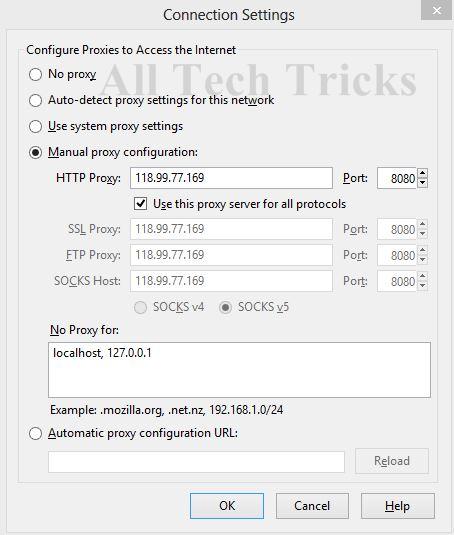
Many Popular browsers support manual Proxy IP address.So using those proxy you can surf anonymously and access all blocked web sites.There are huge list of Free Proxy available on Internet so don't need to buy.You can get it from Here.
All Methods How to Open or Access Blocked Websites at Schools,College and Office Work 
Manual+Proxy
All Methods How to Open or Access Blocked Websites at Schools,College and Office Work 

How to set manual Proxy in Mozilla Firefox:

All Methods How to Open or Access Blocked Websites at Schools,College and Office Work 
Run Firefox browser and go to Option and then click on Advance.Then go to Network Tab and Click Connection settings button.A new box will appear click on Manual Proxy Settings.Now enter Proxy address and Port in box and click on save settings.Now you are surfing internet using Proxy. Many proxy will not work on you Computer so don't worry just keep changing the Proxy address which are not working with the new address.
All Methods How to Open or Access Blocked Websites at Schools,College and Office Work 

3.Redirecting Blocked web sites with URL Shorten Service

All Methods How to Open or Access Blocked Websites at Schools,College and Office Work 
Everyone knows URL shortner sites are used to convert Long URL to Short.But URL shortner site allow you to bypass the security settings.You can use following URL shortner sites Tiny URLMooURL.

4.Using VPN software to unblock Websites

All Methods How to Open or Access Blocked Websites at Schools,College and Office Work 
Using VPN is the best way to access blocked ways.VPN software allows you to browse anonymously, just download it and install on you PC.This Software is available in both paid and free version.Here i have listed some best VPN software.
All Methods How to Open or Access Blocked Websites at Schools,College and Office Work 
VPN+software
All Methods How to Open or Access Blocked Websites at Schools,College and Office Work 
1.ProxyXPN VPN

2.Hotspot Shield VPN
3.Tunnel Bear VPN
All Methods How to Open or Access Blocked Websites at Schools,College and Office Work 

5.Surfing using TOR browser


All Methods How to Open or Access Blocked Websites at Schools,College and Office Work 
TOR+browser

You can use TOR browser to access the blocked websites, but you can't access social networking sites Like Facebook, Twitter, etc.Because these sites needs to store cookies in browser.So you can't access the sites which stores Cookies.Using TOR is the best way to hide you online identity.Just download TOR browser from the below link:- Download from here
All Methods How to Open or Access Blocked Websites at Schools,College and Office Work 

6.Using Decimal Code

All Methods How to Open or Access Blocked Websites at Schools,College and Office Work 
As in the first method i showed instead of using URL, you can access Site using there IP address.But what if there IP address are also blocked, so here works decimal codes.Decimal codes are nothing rather than conversion of IP address in decimal.You can access Blocked web site with their Decimal number and to get Decimal number you need IP address of the Web site URL (Showed in Method 1). Just note down IP address and covert it using this tool
All Methods How to Open or Access Blocked Websites at Schools,College and Office Work 

7.Reading web page in E-mail box

All Methods How to Open or Access Blocked Websites at Schools,College and Office Work 
Email the web is a free service which sends web sites straight away to you mail box.To get web page via mail you have to register on Email the web site and enter the web site URL and enter e-mail address.And you are done.
All Methods How to Open or Access Blocked Websites at Schools,College and Office Work 

8.Using Hola extension

All Methods How to Open or Access Blocked Websites at Schools,College and Office Work 
All Methods How to Open or Access Blocked Websites at Schools,College and Office Work
Hola is a Browser extension which allows you to browse internet anonymously.Hola Browser extension is available for all major Browser.You can download extension for your browser from there official website.
All Methods How to Open or Access Blocked Websites at Schools,College and Office Work  

9.Using Translation service

All Methods How to Open or Access Blocked Websites at Schools,College and Office Work 
Major Search engines like Google and Bing provide you a translation service to covert web page from one language to another.To access blocked web site from this servce, just enter the Web site URL of blocked which you wnat access and convert it into any other languages.Using this you cna convert whole web page into other language and access its content. 
All Methods How to Open or Access Blocked Websites at Schools,College and Office Work 

10.Using Wayback Machine

All Methods How to Open or Access Blocked Websites at Schools,College and Office Work 
All Methods How to Open or Access Blocked Websites at Schools,College and Office Work
All Methods How to Open or Access Blocked Websites at Schools,College and Office Work 
Wayback machine is an online service which keeps a copy of all most all web sites from the day they were started.Just enter Web site URL and click on the latest copy of wayback machine.Using this service you can access Blocked website.
All Methods How to Open or Access Blocked Websites at Schools,College and Office Work 

I hope guys you enjoyed the article.If have any query Feel Free to ask in Comments. 


Russian telecommunication authorities temporarily blacklist Facebook [RT]

Russian telecommunication authorities temporarily blacklist Facebook [RT]

According to  RT report . Facebook was added to Russia’s internet blacklist after content on one of the social network’s pages was deemed to be illegal.
The Russian Federal Service for Supervision in the Sphere of Telecom, Information Technologies and Mass Communications (Roskomnadzor) added the social networking site to the blacklist on Thursday.


The federal service did not specify which content violated its policies, but said it had received 10 complaints against the site. Details of the individual complaints have not been disclosed.
“Three applications have been examined, including those not related to advertising of smoking blends. Facebook has eliminated the violations under two inquiries, and the third has been included to the register. We have already sent a notification to the hosting providers. Facebook has three days to remove the violation, and avoid a ban in Russia,” Roskomnadzor spokesman Vladimir Pikov told ITAR-TASS news agency.
Facebook removed the content later on Thursday. According to media reports, however, the site was never informed that it was facing a ban.
Roskomnadzor acknowledged that Facebook complied with the service’s requirements, adding that the social network would be removed from the register of controversial websites.
On Monday, an advertisement promoting the sale of smoking blends on the site sparked a lively discussion among Facebook users, with many suggesting that such ads are illegal.
The advertisement also caused a stir in Russia’s Federation Council. The head of the Committee on Information Policy, Ruslan Gatarov, said that he appealed to the Federal Drug Control Service to take action against the promotion of drugs and tobacco online.
“We need to do everything so a situation like this does not happen again. I believe this is a clear violation of Russian law, with all the relevant consequences,” Gatarov said.
Russia’s internet blacklist law, which is aimed at protecting children from harmful web content, came into effect in November 2012.
The law enables authorities to force certain web pages offline, even before a trial takes place. This applies to internet sites which contain child pornography, suicide instructions, or promote the use of drugs. In other cases, the decision is to be taken to court.

Monday, 2 September 2013

Hey Aircel Users ! I've a Internet Trick for You Guys!

Hey Aircel Users ! I've a Internet Trick 

for You Guys! 


> Just send IT TO 51333 (TOLL FREE) from your Aircel Number.


> After that send 1 to 51333

> After 24hrs your 100MB will be activated with validity 10 days.


Well, after a month you can repeat the same trick to get more MB 

of 

Data again!


This Trick is working in many Cities so Give it a Try in Your Place 

too and Comment below if it was successful !

Don't forget to share it with Your Friends! 

More Tricks Coming Soon! 

Top Dangerous attack in the history of the Cyberspace::


Top Dangerous attack in the history of 

the Cyberspace::


Robert Tappan Morris and the Morris Worm (1988):


Creator of the first computer worm transmitted through the Internet, Morris, a student at Cornell Univeristy in the USA, claimed it his progeny was not aimed to harm but was made for the innocuous intent to determine the vastness of the cyberspace.
Things went pear-shaped when a the worm encountered a critical error and morphed into a virus which replicated rapidly and began infecting other computers resulting in denial of service. The damage? 6000 computers were reportedly affected causing an estimated $10-$100 million dollars in repair bills.
While this event could be pinned as being an unfortunate accident, it no doubt played a part in inspiring the calamitous distributed denial-of-service (DdoS) type of attacks we see today.

MafiaBoy causes $1 billion dollars in damages (2000):


Another 15 year old that caused mischief in cyber space was Michael Calce a.k.a. MafiaBoy.
In 2000, Calce, now 25, was just a Canadian high school student when decided to unleash a DDoS attack on a number of high-profile commercial websites including Amazon, CNN, eBay and Yahoo!.An industry expert estimated the attacks resulted in a $US1.2 billion dollar damage bill.
He was later apprehended. Because he was still a juvenile, Calce was sentenced in 2001 to eight months in open custody, meaning his movements and actions would be restricted. His online access was also limited by the court.
Calce and since scored gigs as a columnist and recently published a book about his ordeal.

Google China hit by cyber attack (2009):


When Google's Chinese headquarters detected a security breech in mid-December, it opened up a whole can of worms (pun intended) implicating the Chinese Government.
Hackers had gained access to several Google’s corporate servers and intellectual property was stolen.
In a blog, Google said it has “evidence to suggest that a primary goal of the attackers was accessing the Gmail accounts of Chinse human rights activists”. As the company dug deeper, they found numerous Gmail of users from US, China and Europe had been routinely been accessed without permission. Those emails belonged to advocates of human rights in China.
All eyes darted towards the Chinse Government, which has been accused of flagrantly disregarding human rights for years.
Google entered the Chinese market with www.google.cn in 2006 and capitulated to China’s stringent Internet censorship regime. The cyber attacks in December 2009 resulted in the company’s re-evaluation of its business in the country.
In March 2010, Google relocated its servers for google.cn to Hong Kong in order to escape China’s Internet filtering policy.

Teen hacks NASA and US Defense Department:


The year was 1999. Jonathan James was 15 at the time but what he did that year secured him a place in the hacker’s hall of fame.
James had managed to penetrate the computers of a US Department of Defense divison and installed a ‘backdoor’ on its servers. This allowed him to intercept thousands of internal emails from different government organisations including ones containing usernames and passwords for various military computers.
Using the stolen information, James was able to steal a piece of NASA software which cost the space exploration agency $41,000 as systems were shutdown for three weeks.
According to NASA, “the software [purported to be worth $1.7 million] supported the International Space Station’s physical environment, including control of the temperature and humidity within the living space.”
James was later caught but received a light sentence due to his young age.
He committed suicide in 2008 after he was accused of conspiring with other hackers to steal credit card information. James denied the allegation in his suicide letter.

Phone lines blocked to win Porsche (1995)


Kevin Poulsen is famous for his work in hacking into the Los Angeles phone system in a bid to win a Ferrari on a radio competiton.
LA KIIS FM was offering a Porsche 944 S2 to the 102th caller. Poulsen guaranteed his success as he took control of the phone network and effectively blocked incoming calls to the radio station’s number.
He won the Porsche but the law caught up to him and he was sentenced to five years in prison.
Poulsen later became the senior editor for IT security publication, Wired News.

Hacker targets Scientology (2008):


In January 2008, a New Jersey teenager along with a gang of hackers launched a DDoS attack that crippled the Church of Scientology website for several days.
The group is dubbed Annoymous and is staunchly against the ‘religion’.
Dmitriy Guzner, who was 19 years old, was charged and convicted for the DDoS attack. The maximum penalty was 10 years prison and a $250,000 fine but he was ultimately sentenced to two years probation and was ordered to pay the Church of Scientology $37,500.
A second man has been charged for the attack